AI research that cites quotes and timestamps in your recordings
Hear a claim in the speaker’s own words before you rely on it.
In short
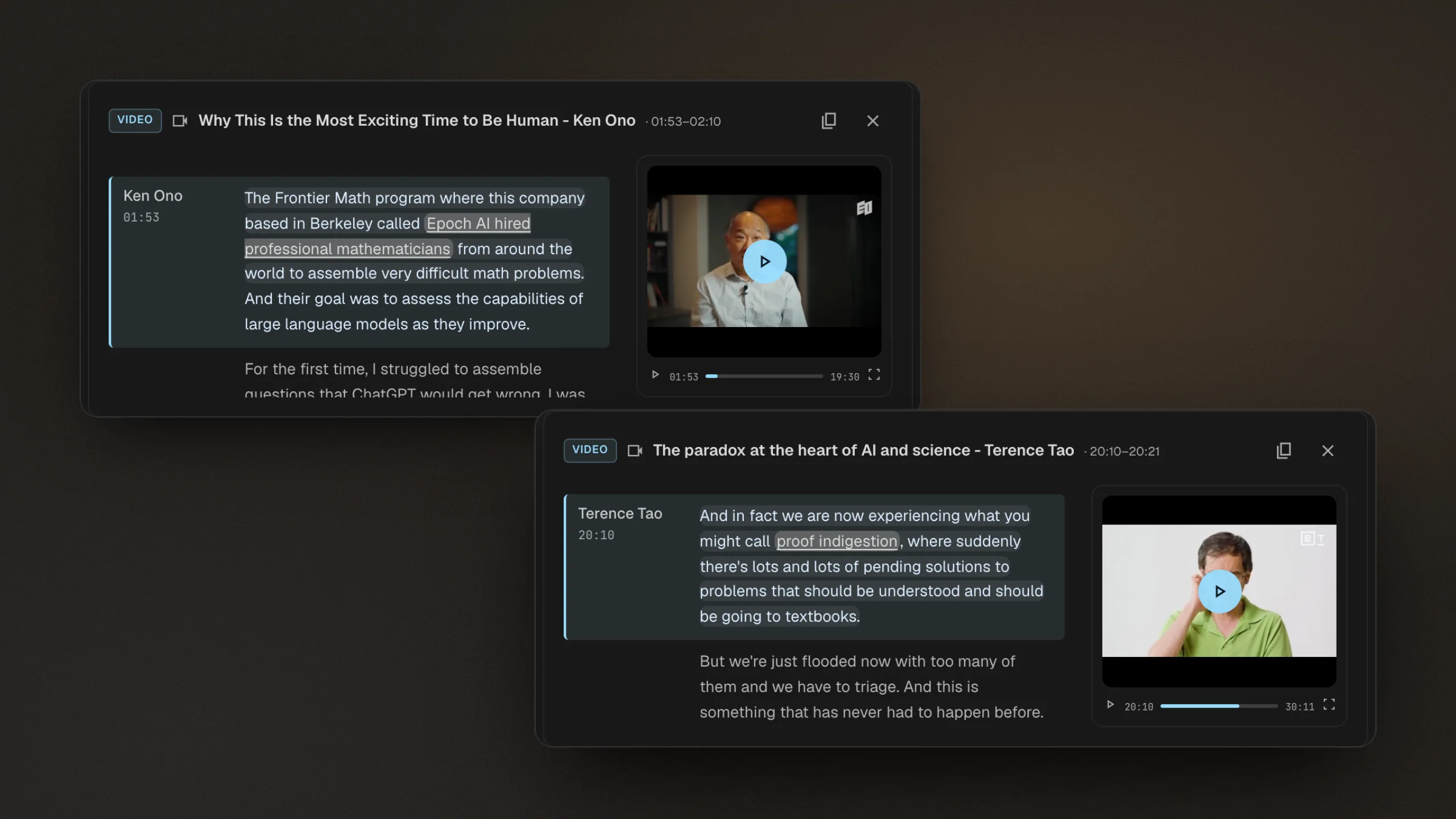
Citaria cites audio and video recordings the way it cites documents. A citation to a recording names the speaker, shows the timestamp, highlights the quoted sentence in the transcript, and starts playback near it. Recordings are researched together with your documents and the open web, in the same report.
- Formats
- Common audio and video files, up to 2 GB each
- Import
- Upload directly or import from Google Drive
- Transcripts
- Speaker labels, timestamps, language detection; editable
- Citations
- Quoted sentence highlighted; playback starts near it
- Sharing
- Public-link readers can play cited recordings, no sign-in
From recording to a citation you can play
- 01
Add your recordings
Upload audio or video files, or import them from Google Drive. Citaria transcribes each one with speaker labels and timestamps.
- 02
Fix the transcript if needed
Rename speakers, move a line to the right speaker, split or merge lines, or correct the text. Citations follow your edits.
- 03
Click to hear the quote
The citation opens the transcript at the quoted sentence and starts playback near it, with transcript and playback in sync.
Every recording becomes citable evidence
Customer interviews
Quote what customers said, with the timestamp to hear it again.
Expert calls
Back a finding with the expert’s own words, not a paraphrase.
Talks and webinars
Cite the point where a speaker made the argument you rely on.
Which AI research tools can play the cited part of a recording?
Citaria is our product. Facts about other tools come from their official documentation; the review date and sources are at the foot of this page.
| Tool | Works with recordings | Where a citation to a recording leads |
|---|---|---|
| Citaria | Audio and video you upload or import from Google Drive, transcribed with speakers and timestamps | Opens the transcript at the quoted sentence and starts playback near it |
| Manus | Transcribes audio and video with speaker labels and timestamps | Jumping to the cited moment is not described in its documentation |
| Perplexity | Transcribes uploaded audio and video with speaker labels | Jumping to the cited moment is not described in its documentation |
| NotebookLM | Audio files and YouTube videos imported as transcripts | Citations to YouTube videos link to the video’s transcript |
| ChatGPT | Audio uploads on paid plans; video files are not supported by audio uploads | Not described for Deep Research |
| Gemini | Audio and video uploads, with length limits by plan | Not described for Deep Research |
| Elicit | Accepts PDF, DOCX, XLSX, and PPTX uploads; audio and video are not described | Not described in its documentation |
Can Citaria cite a timestamp in a video or audio recording?
Yes. When a finding comes from a recording, the citation shows the speaker and timestamp and highlights the quoted sentence in the transcript. Clicking it starts playback near that sentence, so you can hear the claim in context.
How precise is a recording citation?
It highlights the quoted sentence and starts playback near it. Timing within a speaker’s turn is estimated from the transcript, so playback can begin slightly before or after the first quoted word.
Can people I share a report with play the recordings?
Yes. Readers of a public link can click a recording citation and hear it without signing in.
Which recording formats does Citaria support?
Common audio and video files, such as MP3, M4A, WAV, MP4, MOV, and WebM, up to 2 GB each, uploaded directly or imported from Google Drive.